





Invoice Automation for AX 2012 R3: Controls Before Posting
Capturing an invoice does not make it ready for posting. For retailers using Microsoft Dynamics AX 2012 R3, automation needs to connect invoice data with purchase orders, confirmed receipts and approval authority—not simply replace manual entry with AI/OCR.
This article examines a proposed design in TECHWORLD’s solution materials. It is not a completed-project case study or a report of measured performance.
Three layers: capture, matching and accounting
The proposed architecture separates the invoice platform, business integration layer and ERP. Each has a distinct responsibility:
- VNPT Invoice/Inbot: collects invoices and manages XML/PDF files, source information and checking results. The materials describe email, VNPT portals, tax-authority data, XML uploads and manual entry as intake channels.
- TECHWORLD BES Integration Layer: maps suppliers, items, units and PO/GR references; applies matching rules; routes exceptions; logs transactions; and supports reprocessing after integration failures.
- Dynamics AX 2012 R3: records purchasing, receiving, invoices and payables subject to approved conditions.
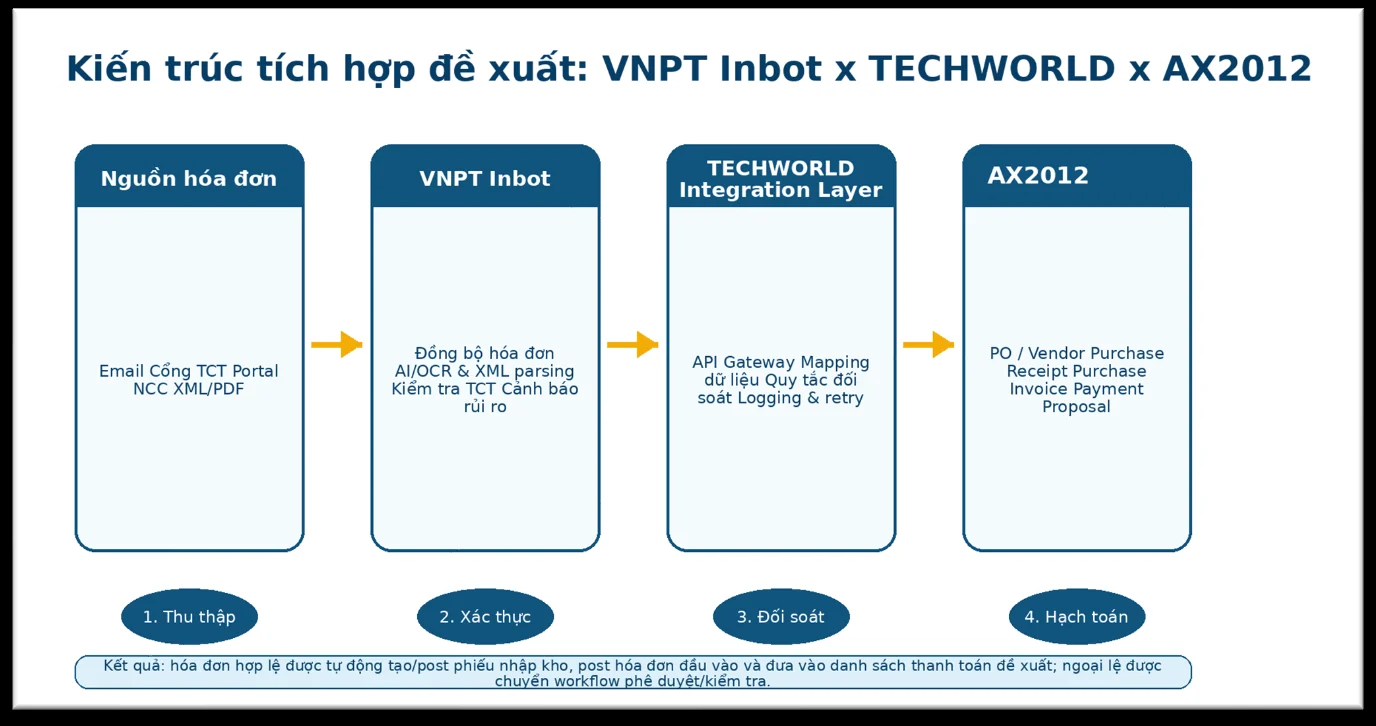
An important distinction: the invoice platform can be configured to change approval status according to the intake source. That Approved label does not replace purchasing checks, actual receipt confirmation or ERP posting authority.
Three-way matching must preserve receiving evidence
Three-way matching links the supplier invoice, purchase order (PO) and goods receipt (GR). Microsoft’s AX 2012 documentation describes the underlying comparison of invoices, purchase orders and product receipts. Additional rules in the integration proposal still require their own specification and testing.
Separate identity checks from tolerances
In the proposed model, supplier tax identifiers, PO references and mapped item identifiers must satisfy mandatory matching requirements. Similar item descriptions may help identify candidates for review; they are not sufficient to establish item identity automatically.
Quantities, prices, line amounts, tax, promotional items, discounts and totals require appropriate checks. Each rule needs a defined comparison basis, unit-conversion method and acceptance condition at line or invoice-total level. No single tolerance percentage is presented here as suitable for every organization.
A matching score cannot offset a mandatory failure
An invoice may satisfy most checks and still need to stop because the supplier is wrong or a discrepancy exceeds the acceptance conditions. Scores should help prioritize exceptions, not override blocking rules.
The source design requires invoiced quantity not to exceed actual received quantity on the GR. If matched data is used to prepare a draft GR, users must still review, correct and confirm the actual receipt. A draft GR is not evidence that goods have arrived.
From intake to payment proposal
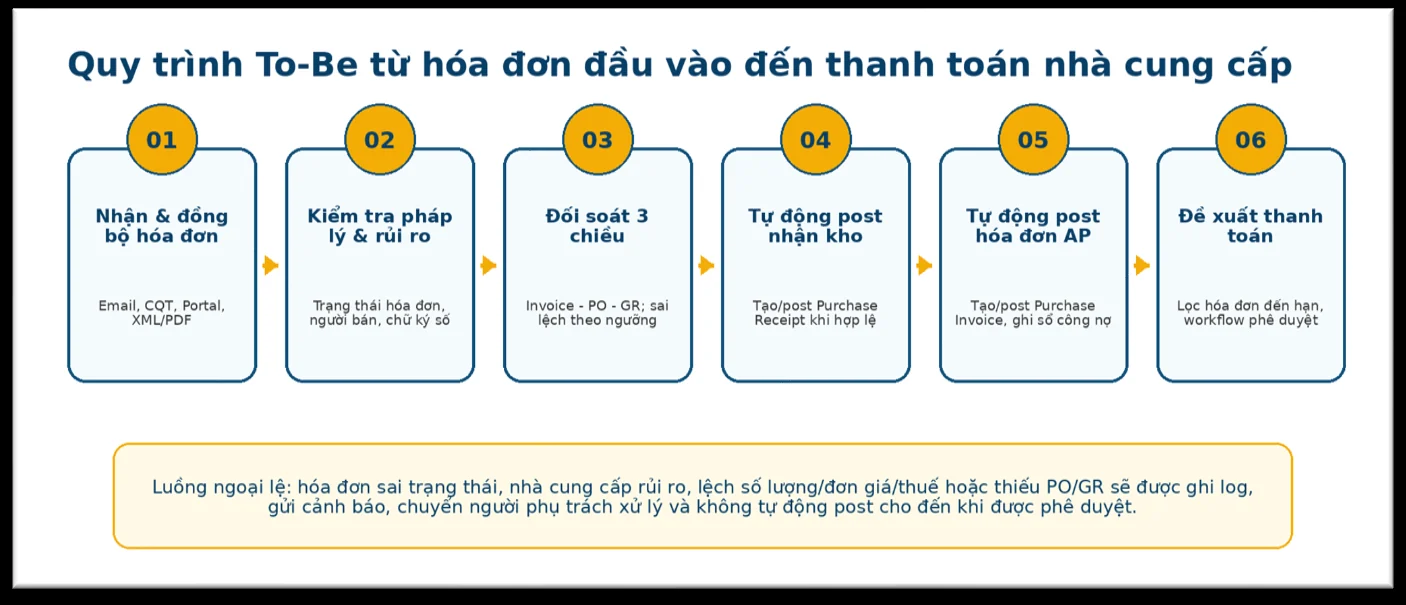
- Receive: retain the source, original files and identifiers for duplicate checks.
- Normalize: parse XML or extract data with AI/OCR, then map it to ERP master data.
- Check status: identify cancelled, replacement or adjusted invoices and seller alerts that require verification.
- Match: compare Invoice–PO–GR and route discrepancies to exception handling.
- Confirm and record: validate actual receipt, complete approvals and record documents only when conditions are met.
- Prepare payment proposals: select due invoices using payable balances, processing status and approval authority.
Exceptions need ownership
The design separates documents that can proceed, documents requiring review and documents that must be held. Every exception needs a reason, an assigned owner, a deadline and a resolution status.
- Accounts payable: reviews invoices, payables and checking results.
- Procurement: verifies purchase orders, prices, discounts and suppliers.
- Warehouse teams: confirm actual receipt, units and quantity discrepancies.
- Finance management: approves exceptions and payment proposals within assigned authority.
- IT administrators: monitor connections, synchronization schedules and integration failures.
Logs should retain matching results, approvers, timestamps and related documents so that processing decisions can be traced.
Design for AX—and account for its lifecycle
The proposal includes AIF, integration services, batch jobs and staging tables. Microsoft documents Services and the Application Integration Framework for AX 2012. Connection mechanisms, service permissions and access boundaries must nevertheless be confirmed against the installed environment. Code or APIs from another Dynamics product do not demonstrate AX compatibility.
According to Microsoft’s product lifecycle information, extended support for AX 2012 R3 ended in 2023. Integration investment should therefore include platform-risk assessment and consideration of a future transition. Support from an implementation provider does not reinstate Microsoft product support.
Roll out in stages and measure actual outcomes
The proposal favors an initial semi-automated phase: users review results, confirm GR information and authorize posting. Broader automatic posting follows only after the data and rules have been validated.
Readiness requires agreement on supplier and item records, unit conversions, legal-entity scope, invoice sources and the approval matrix. Testing should cover successful transactions as well as missing PO/GR references, duplicate invoices, status changes and connection failures.
The proposed approach includes unit, integration, end-to-end and user acceptance testing, together with role-based training. Once operational, invoice-processing KPIs, automatic-posting rates and exception causes provide a basis for refining rules—not evidence of benefits already achieved before implementation.
Begin with data and control conditions
To assess the appropriate scope, prepare information on invoice sources, PO/GR data quality and current approval authority. These inputs provide a practical basis for discussing invoice automation requirements with TECHWORLD.
References
- DynamicsAX2012-technet/dynamicsax2012-technet/services-and-application-integration-framework-aif.md at main · MicrosoftDocs/DynamicsAX2012-technet · GitHub
- New, Changed, and Deprecated Features for Microsoft Dynamics AX 2012
- VNPT Invoice Inbot: Quản lý hóa đơn điện tử đầu vào nhanh chóng, hiệu quả
- Security architecture for Web services
- Dynamics AX 2012 R3 – Microsoft Lifecycle | Microsoft Learn